From Manual Checks to 100+ Automated Tests: AI-Assisted QA at Q
October 5, 2026 — 8 min read

Rebuilding Q’s website test suite with TypeScript, Playwright, and Cursor – here’s the flow, the rules, and what we covered.
At Q, we decided to cover our rebuilt site with a fresh set of automated test suites, as our manual suite stopped scaling. Dozens of pages, three viewport sizes, mobile-only navigation patterns, plus content and SEO checks no one wants to run by hand every release. We needed automation that was fast to build and slow to break, not a pile of scripts no one understands.
This article shows you how our QA team built a Playwright suite with AI assistance, the workflow we used, the rules we enforced, and what the suite covers today.
Web and marketing pages look simple until you test them properly. Mega menus, overlay navigation on mobile devices, cookie banners, shared footers, different module margins, Lighthouse scores that drift, grammar and spelling errors in content for the intended audience (British English). Running that manually before the release is slow and exhausting. Skipping it makes things worse.
Our goal was not more testing. It was provable quality: repeatable checks, clear failure signs, and a structure the next engineer, or the next AI session, can extend without reverse-engineering from chat history.

We started with the in-house plug-and-play “AI Automation Template” starter kit. A TypeScript kit with Playwright, page objects, MCP, GitLab CI hooks, project structure, and Cursor rules for writing and coding test cases, all prepped. The target was our public web. Well, the pre-production version in development, to be precise. Later, production itself.
Development happened in Cursor with Playwright MCP enabled. That matters: the agent opens a real website in a real web browser before it writes the locators. We are not pasting HTML or CSS from memory.
The working principle is simple: AI writes, humans review. Every spec is run manually before it is added to the testing suite. Locators live in page objects, not scattered across test files.
Every new check follows the same path:
BASE_URL via Playwright MCP and maps the screen.tests/pages/ and is registered in PageManager.tstests/*.spec.ts evaluates a single scenario, categorised using @smoke or @regression annotations.npm run test:smoke on your machine and resolve any broken assertions before committing changes.TestMo to track deployment readiness.GitLab CI pipelines execute scheduled weekly or on-demand pipelines covering regression, content (grammar/spelling), and SEO checks.A typical first prompt looks like this:
Open the Contact Us page with Playwright MCP.
Update the page object, then write one @smoke test
that verifies the form and confirmation message.
Use getByRole before CSS. Run the test and fix failures.
Executing a prompt like this eliminates hours of tedious boilerplate work, provided your repository already defines clear standards for test structure.
Ad-hoc AI instructions fade when teammates change. To ensure every engineering session operates seamlessly on autopilot, we defined our repository conventions directly within .cursor/rules/:
| Rule | Core benefit |
Locator precedence: getByRole → getByLabel → getByText → getByTestId | Resistant to DOM changes |
Page models house selectors ✅ Specs invoke PageManager ✅ | Update element targets centrally |
| Isolated assertions per spec ✅ | Unambiguous errors and swift fixes |
Annotations: @smoke, @regression, @content, @seo | Trigger targeted validation passes |
Auto-waiting matchers ✅ Avoid waitForTimeout ❌ | Minimises test flakiness |
Store credentials only in .env ✅ | Secure baseline for public environments |
Files like playwright-testing.mdc and writing-tests.mdc tell the agent to inspect before coding. That differentiates AI-assisted engineering from copying generated code into a blank folder.
Here is the example for the playwright-testing.mdc file:
---
description: How to help the user create and run Playwright UI tests in this project
alwaysApply: true
---

# Playwright Frontend Testing Assistant

This repo is a plug-and-play starter for **frontend (UI) testing** with Playwright.
The people using it may be new to test automation. Be a helpful guide: explain in
plain language, and prefer small, working steps over big abstractions.

## Use the Playwright MCP to look at the real app
A Playwright MCP server is configured in `.cursor/mcp.json`. Before guessing locators,
USE IT to open the user's app, read the page (snapshot/accessibility tree), and find the
real, stable locators. Never invent selectors when you can inspect the live page.

## Workflow when asked to write a test
1. Confirm the URL/flow to test (check `BASE_URL` in `.env`).
2. Open the relevant page with the Playwright MCP and inspect it.
3. Add/Update a **page object** in `tests/pages/` (locators + actions there).
4. Register new page objects in `tests/PageManager.ts`.
5. Write a spec in `tests/` (e.g. `tests/examples/`) using the PageManager.
6. Run it (`npm test`) and fix failures. Keep tests independent and deterministic.

## Locator priority (most to least robust)
`getByRole` → `getByLabel` → `getByText` → `getByTestId` → CSS/XPath (last resort).

## Keep it simple
- One page object per screen; keep tests short and readable.
- Use web-first assertions (`await expect(locator).toBeVisible()`), never `waitForTimeout`.
- Don't add API, visual, or accessibility testing here — this starter is UI-only.

## Project facts
- Config: `playwright.config.ts` (single Chromium project + `setup` login project).
- Login: `tests/auth.setup.ts` runs once using `.env` credentials; edit it if the login form differs.
- Run tests: `npm test` · UI mode: `npm run test:ui` · smoke only: `npm run test:smoke`.A significant portion of our framework relies on data-driven execution, while a single spec iterates across lists of target pages, meaning new route coverage usually requires editing a dataset rather than duplicating test files.
Work is organised in tagged suites so CI can run smoke in minutes and regression on schedule:
| Suite | Tag | Core benefit |
| Smoke | @smoke | Validates critical page loads and hero sections |
| Regression | @regression | Tests layouts across desktop, iPad, and iPhone |
| Content | @content | Verifies GB spelling, grammar, and H1 casing |
| SEO | @seo | Monitors Google Lighthouse metrics on key pages |
At the current scale, we now have:
Across our pipelines, this breakdown equals:
Automated regression sweeps evaluate Chromium across three distinct screen sizes within CI. Engineers can also run Safari/WebKit locally whenever they need additional verification prior to deployment.
The full regression, content, and SEO run takes about an hour and a half from trigger to published report – work that would otherwise cost a QA engineer the better part of a day of manual checking. And because it runs in CI against the live site with no manual intervention, it happens without pulling anyone off other work and without any disruption to the team or to a single visitor browsing through our website.
The test suite finishes in a few minutes. Full regression, content, and SEO are executed on GitLab via a weekly schedule, and it does not run on every push. Three jobs (regression, content, seo) publish HTML reports and PDF summaries, and the email job sends artifact links to stakeholders. For non-technical team members, our pipeline compiles detailed reports into PDF attachments sent via automated email updates. This gives marketing stakeholders immediate visibility into current content accuracy and SEO performance without requiring direct access to CI build logs.
What AI did well:
What still needed humans:
This is the limit worth naming plainly: The agent can write a syntactically correct test case for the wrong behaviour just as easily as for the right one, so every spec still gets a human read before it merges.
That same template, including the MCP inspection, repo rules, tagged suites, and TestMo traceability, is now our reference for internal products too. The pattern travels; locators do not.
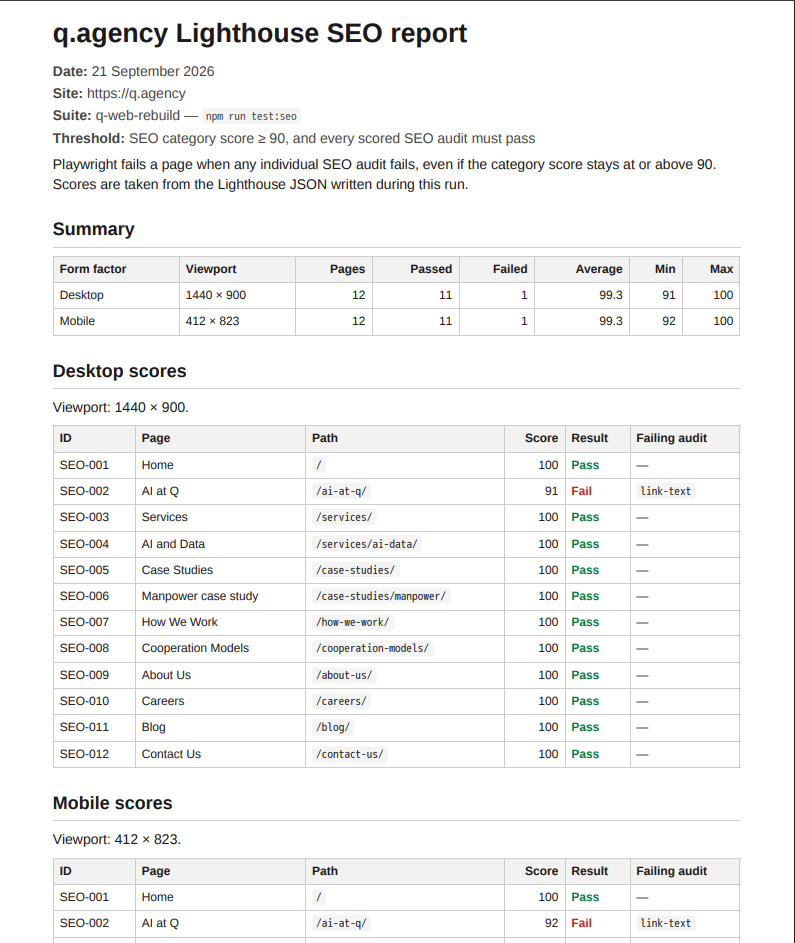
Ultimately, leveraging AI for test automation offers an effective way to handle tedious manual checks, provided you enforce a robust set of rules and adhere to established engineering standards during agent-based development:
This approach lets us bring E2E testing to any project, regardless of its size or whether a QA engineer is on the team. It gives developers a safety net, makes AI-driven development feel safe, and leaves a verifiable record of what was built and how it behaves. In an era where “vibe coding” has made it easy to ship code nobody fully understands, we think the difference between a partner you can trust and one you can’t comes down to accountability. We use AI to move faster, but we don’t hand our responsibility over to it. Every feature we deliver is backed by tests that prove it works, and that’s a standard we hold ourselves to on every project.

Ante is the Manager of QA Excellence at Q. With over a decade of experience in software quality assurance, Ante has grown from hands-on manual and automation testing roles to leading quality strategies across diverse projects. His career spans both large-scale enterprise systems and fast-moving startup products, always driven by a commitment to delivering top-tier software quality. When he's not championing quality, Ante enjoys snowboarding across Europe’s mountain peaks and, as a former competitive swimmer, gliding through the Mediterranean seaside.
Partner with us